

If you’re a long-time Geek Bar user who’s always excited to see what the brand comes out with next, you may have already landed on the Geek Bar Pulse 2. But before you start using it, you probably want the full picture. This Geek Bar Pulse 2 review covers what’s new, how the device works, its different Mode options, display, charging setup, flavor profiles, and other key details you should know before getting started.
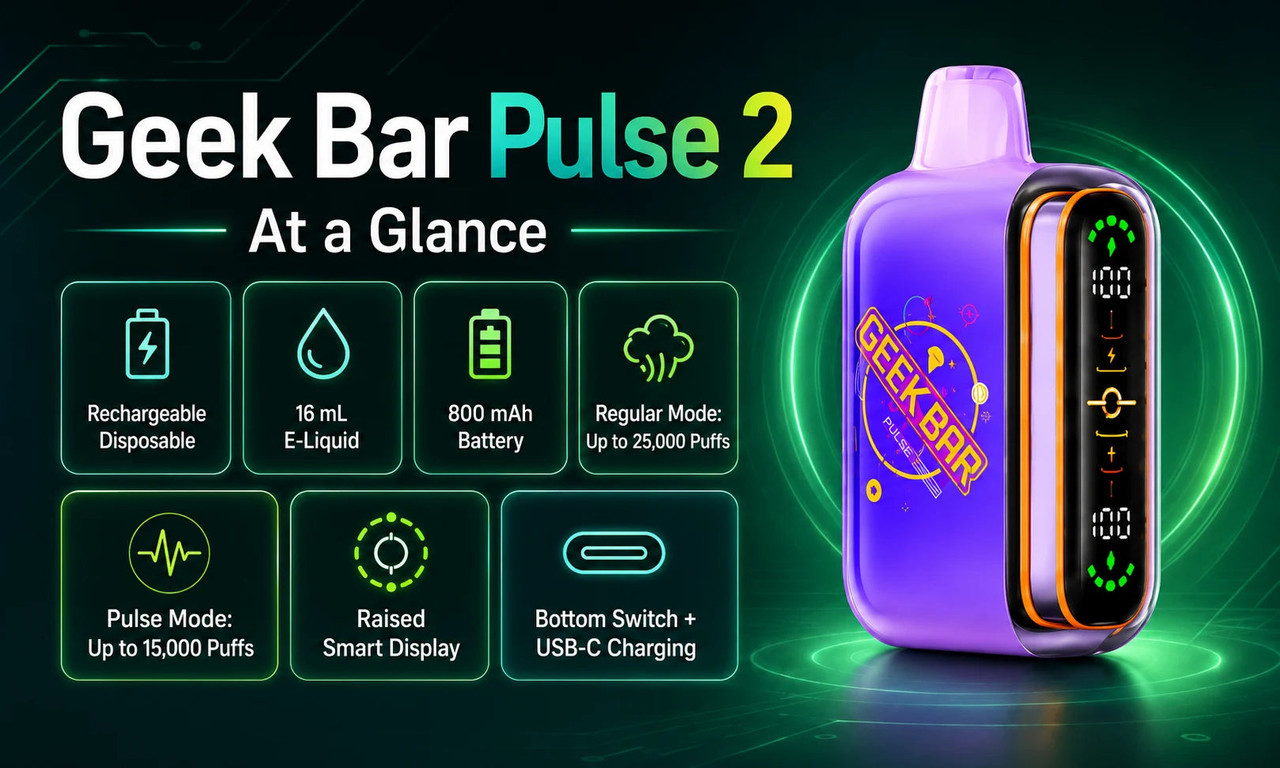
Geek Bar Pulse 2 is a rechargeable disposable designed for adult consumers who want a visible battery and e-liquid display, simple Mode switching, and USB-C charging. It is manufacturer-advertised for up to 25,000 puffs in Regular Mode or up to 15,000 puffs in Pulse Mode, so the Mode you select affects the advertised puff range.
The Pulse 2 builds on the original Geek Bar Pulse format with a raised full-screen display, a bottom Mode control, a rechargeable battery, and two output settings. We focus on the details that matter before you choose a device: what each Mode does, what the screen shows, how charging works, and how the flavor lineup differs.
Explore Our Categories


Geek Bar Pulse 2 at a Glance
|
Feature |
Manufacturer-listed detail |
What it means for you |
|
Device type |
Rechargeable disposable |
The device arrives prefilled and is not intended for refilling. |
|
E-liquid capacity |
16 mL |
Capacity is one factor behind the manufacturer-advertised puff range. |
|
Battery |
800 mAh |
You can recharge the internal battery through the USB-C port. |
|
Regular Mode |
Up to 25,000 puffs |
This setting is associated with the highest manufacturer-advertised puff total. |
|
Pulse Mode |
Up to 15,000 puffs |
This setting uses a different output configuration and has a lower advertised puff total. |
|
Display |
Raised smart display |
You can check the active Mode, battery level, and e-liquid indicator. |
|
Controls |
Bottom switch |
The switch changes Modes and can turn the device off when it is not in use. |
|
Charging |
USB-C |
The battery can be recharged with a compatible USB-C cable and power source.
|
Actual puff totals, charging time, and e-liquid use can vary based on the active Mode, draw duration, charging equipment, and individual use. Treat all puff figures as manufacturer-advertised maximums rather than guaranteed results.
What Is New on the Pulse 2?
Geek Bar Pulse 2 keeps the familiar disposable format while adding more visible device information. The most noticeable update is its raised full-screen display. Instead of relying on a small status light, you can check key information on the screen before charging or replacing the device.
The display is designed to show the selected Mode, approximate battery level, and e-liquid indicator. This gives you a quick status check without needing an app, menu system, or separate accessory.
The device also uses a bottom control to switch between Regular Mode and Pulse Mode. The control system is simple. Move the switch, check the screen, and confirm the active setting before using the device.
Geek Bar also lists faster charging for the Pulse 2. With a compatible power source, the battery is advertised to reach approximately 80% charge in about 15 minutes. Charging time can vary based on the cable, power source, and remaining battery level.
Regular Mode vs. Pulse Mode
The selected Mode affects the device’s manufacturer-advertised puff range and output configuration. This is one of the most important details to understand before choosing Pulse 2.
|
Setting |
Manufacturer-advertised puff range |
Configuration |
Best for |
|
Regular Mode |
Up to 25,000 puffs |
Single-coil setting |
Adult consumers who prioritize the highest stated puff range |
|
Pulse Mode |
Up to 15,000 puffs |
Dual-coil setting |
Adult consumers who prefer a different output setting and airflow feel
|
Regular Mode is associated with up to 25,000 puffs. It uses a single-coil configuration and is the setting to choose if you want the highest manufacturer-advertised puff total.
Pulse Mode is associated with up to 15,000 puffs. It activates a dual-coil configuration and uses more power per draw, which is why its advertised puff total is lower.
Neither Mode is automatically better. Regular Mode is the practical choice if the advertised puff range is your main priority. Pulse Mode provides a different output setting for users who prefer that device behavior.
In our review of the Geek Bar Pulse 2 vape, we recommend checking the display each time you move the bottom switch. This confirms the Mode before you use the device.
Display, Controls, and Airflow
The smart display is one of the Pulse 2’s most practical features. It provides product-status information that many basic disposable devices do not show clearly.
You can use the display to check:
-
The active Mode.
-
Approximate battery status.
-
The e-liquid level indicator.
The bottom switch changes the device setting and can turn the device off when it is not in use. Read the instructions included with your specific package before use because packaging details and switch markings may vary between production runs.
Airflow behavior changes with the selected Mode. This gives you a straightforward control setup without a separate adjustable airflow dial.
Battery and USB-C Charging
Pulse 2 uses a rechargeable internal battery and a USB-C charging port. Recharge the device when the battery indicator shows that power is low.
Use a compatible USB-C cable and an appropriate power source. Disconnect the device after charging, and do not use damaged cables, damaged power sources, or a damaged device. Follow the charging instructions included with the current product package.
The battery indicator helps you plan when to recharge. You can check the display before leaving home instead of discovering that the device needs power later.
Remember that charging restores battery power only. It does not refill the device. When the e-liquid is depleted, do not attempt to open or refill the device. Follow applicable local disposal requirements.
Geek Bar Pulse 2 Flavors

The Geek Bar Pulse 2 lineup includes a mix of fruit, ice, candy-inspired, and Hubba Edition flavors. Each flavor profile is designed around different taste preferences, from refreshing fruit combinations to sweeter candy-style blends. Since flavor experience can vary from person to person, use these descriptions as a general guide when choosing your preferred option.
|
Flavor |
Profile |
May suit you if you prefer |
|
Peach flavor with a cooling ice finish |
Sweet fruit profiles with a refreshing touch |
|
|
Crisp apple notes with a sour-inspired and icy finish |
Tangy fruit flavors with a cooler profile |
|
|
Candy-inspired gummy flavor with a chilled finish |
Sweet candy-style profiles with a cooling note |
|
|
Raspberry and watermelon fruit combination |
Balanced berry and melon-inspired flavors |
|
|
Fruit-forward profile with a bold flavor blend |
Users looking for a unique mixed-fruit option |
|
|
Sweet and sour fruit-inspired profile |
Candy-style flavors with a tangy twist |
|
|
Blue raspberry flavor with an icy finish |
Berry flavors with a refreshing cooling effect |
|
|
Watermelon profile with a cool finish |
Classic melon flavors with added freshness |
|
|
Strawberry and watermelon blend with bubblegum-style notes |
Familiar fruit combinations with a sweeter cand influence |
|
|
Lemon profile balanced with sweeter bubblegum-style notes |
Citrus flavors with a candy-inspired finish |
|
|
Blue raspberry combined with bubblegum-style notes |
Sweet berry profiles with a candy-style character |
|
|
Bar Pulse 2 |
Grape flavor with bubblegum-style notes |
Classic grape-inspired candy flavors |
|
Peach-forward profile with bubblegum-style notes |
Softer fruit profiles with a sweeter finish
|
If you are trying Pulse 2 for the first time, choose a profile you already know you enjoy. That is usually more useful than selecting a flavor only because it is new.
Pros and Considerations

What Stands Out
-
The smart display makes battery, Mode, and e-liquid status easier to check.
-
Regular Mode and Pulse Mode provide two settings in one device.
-
The USB-C charging port supports recharging while e-liquid remains.
-
The bottom switch gives you a simple way to change the active Mode.
-
The Hubba collection gives the launch lineup a consistent fruit-and-bubblegum flavor theme.
What to Consider
-
The manufacturer-advertised puff total changes by Mode.
-
The e-liquid indicator is a guide, not a laboratory measurement.
-
The launch flavor lineup may be smaller than longer-established Geek Bar collections.
-
Geek Bar Pulse 2 is prefilled and is not designed for refilling.
-
Product specifications, availability, packaging, and flavors may vary by retailer and location.
Frequently Asked Questions
How many puffs does the Geek Bar Pulse 2 offer?
Geek Bar advertises up to 25,000 puffs in Regular Mode and up to 15,000 puffs in Pulse Mode. Actual puff totals can vary based on the active Mode, draw duration, and individual use.
Is the Geek Bar Pulse 2 rechargeable?
Yes. Geek Bar Pulse 2 has a rechargeable internal battery and a USB-C charging port, so you can recharge the battery while prefilled e-liquid remains.
Can you refill the Geek Bar Pulse 2?
No. Geek Bar Pulse 2 is a prefilled disposable device that is not designed for refilling; charging restores battery power only and does not replace e-liquid.
What does the Geek Bar Pulse 2 screen show?
The Geek Bar Pulse 2 screen shows the selected Mode, battery level, and e-liquid indicator. These on-screen indicators help you check the device’s current status before charging or replacing it.
Final Take
If you’re ready to explore more Geek Bar Pulse 2 flavors and other Geek Bar options, explore GeekBarDepot.com to browse available varieties and find a device that fits your vaping preferences. Discover new flavors, check the latest selections, and start exploring the next generation of Geek Bar devices.